
Let's be honest, most people don't love change, especially when it comes to the software they use every day. Nevertheless, some changes are worth embracing because they help you work more efficiently. That’s where Zoho CRM's new NextGen User Interface (UI) steps up. It delivers a cleaner, more intuitive experience designed to help users spend less time navigating and more time building relationships.
Whether you're a long-time Zoho CRM user or just getting started, the new interface makes it easier to find what you need, customize your workspace, and stay focused on the tasks that matter most. Let's explore the new features!
Enhanced Workspace
The NextGen UI introduces a streamlined layout with two primary work areas:
-
-
- The unified sidebar provides quick access to your modules, reports, analytics, setup, and other tools.
- The main workspace displays the information you're actively working on, giving you a larger, less cluttered view of your records.
-
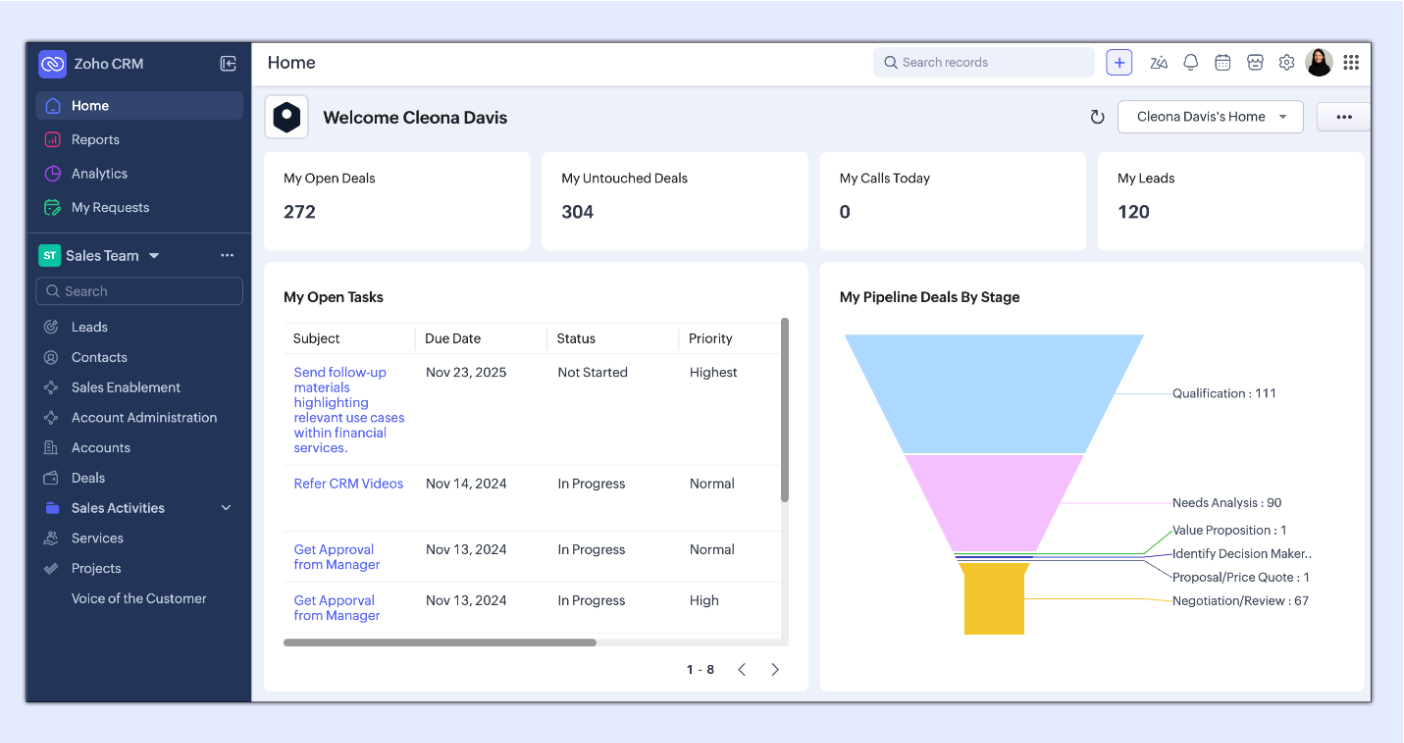
If more space is needed, you can collapse the sidebar to maximize the screen and expand it again to use the navigation.
Simple Navigation
The sidebar organizes your CRM into folders and modules, making it easier to move between Leads, Contacts, Deals, Accounts, and custom modules. Users can quickly expand or collapse folders, while administrators can access module configuration options directly from the navigation menu.
For organizations using Teamspaces, switching between departments or business units is effortless. If you belong to multiple Teamspaces, you can move between them with just a few clicks, helping keep teams organized while maintaining visibility across the business.
Navigation has also been improved at the record level. The redesigned Related Lists experience allows the user to open and navigate to emails, notes, activities, deals, and other related records with ease. Simply hover over the Related List icon to instantly view associated records or expand the panel if you regularly work with related information. There are similar improvements when using Filters in the list views as well.
Finally, in the sidebar, you'll find access to Reports and Analytics. No more searching through tabs to find these areas.
Find It and Create It Faster
One of the best improvements is that Global Search has become even more powerful. From the search bar at the top of your CRM, you can search across all modules or focus on a specific record type to quickly locate the information you need.
Another small change that makes a big difference is the new "+" button. Instead of searching for the Quick Create option, you can now create new records from almost anywhere in the CRM with a single click.
Personalize Your Experience
The new UI introduces several personalization options to help users work more comfortably throughout the day.
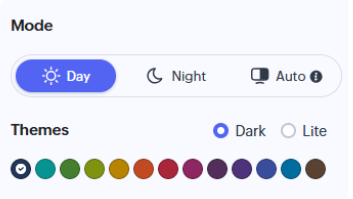
Users can now choose between:
-
-
- Day Mode for a bright, modern workspace
- Night Mode to reduce glare during extended work sessions
- Auto Mode, which automatically matches your device's appearance settings
-
Additional themes allow users to personalize the look and feel of their CRM while maintaining a professional, consistent interface.
Streamlined Enhancements for Administrators
CRM administrators will also notice several improvements behind the scenes. Enhancements to the Setup area include:
-
-
- A powerful search feature to quickly locate configuration settings
- Frequently Used shortcuts that automatically surface your most accessed tools
- State Persistence, which remembers the setup sections you've expanded or collapsed, creating a more personalized administrative experience
-
These enhancements reduce the time spent navigating configuration menus, making system administration significantly more efficient.
Organization of Essential Tools
The utility menu has also been consolidated, giving users faster access to essential tools.
-
-
- Calendar
- Marketplace
- Signals
- Setup
- User Profile
- Organization switching
- Subscription management
- Support resources
-
Everything you need is available from a single, reliable location.
Why the NextGen UI Matters
The new Zoho CRM for Everyone interface isn't just a visual refresh; it's designed to improve productivity. By reducing clicks, minimizing clutter, improving navigation, and offering greater personalization, the NextGen UI helps users stay focused on what matters most: managing customer relationships and growing the business.
If your organization hasn't explored the new interface yet, now is a great time to take a look. The improvements are immediately noticeable, and after just a short time, you'll wonder how you ever worked without them!
Whether you're in sales, customer service, marketing, or administration, the redesigned experience makes Zoho CRM faster to navigate, easier to learn, and more enjoyable to use. For more information about Zoho and how to improve your CRM’s functionality, reach out for a free 30-min consultation by calling 1-800-880-1960 or emailing info@toplineresults.com.
You must be logged in to post a comment.