
We’ve all received a sales call we wish we hadn’t. Do Not Call (DNC) lists are designed to help reduce those unwanted calls, but they can also come into play when your team is researching prospects in ZoomInfo. A phone number available in ZoomInfo may belong to someone who has registered it on a DNC list, making it important to understand how ZoomInfo identifies and handles that information.
Do Not Call, or DNC, registries allow people to register their phone numbers to help limit unwanted telemarketing calls. These lists are primarily aimed at business-to-consumer sales calls, such as a company contacting someone to offer a home service. However, DNC lists can also be relevant when researching business contacts, since a person’s listed business number may actually be their personal cell phone.
So, how does ZoomInfo handle these numbers? ZoomInfo provides an optional Do Not Call suppression setting that hides phone numbers found on supported DNC registries. Enabling it will apply the functionality across your entire organization, including contact profiles, list views, advanced search, Enrich, and integrations. This allows you to account for registered numbers, both when your team researches prospects in ZoomInfo and when it sends contact data to connected systems.
Here is some additional information: ZoomInfo DNC Suppression Overview
Wondering how to enable this feature? ZoomInfo administrators can turn on the DNC Suppression List in just a few steps:
-
-
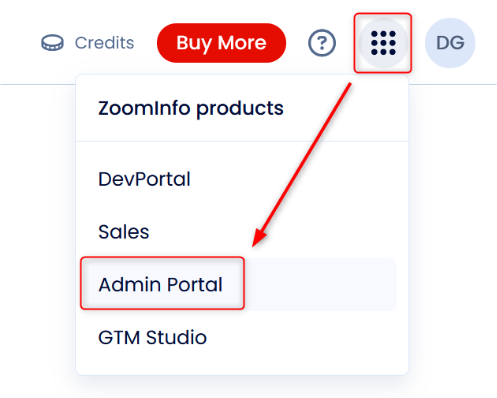
- Open the Admin Portal in the top right-hand corner of ZoomInfo.
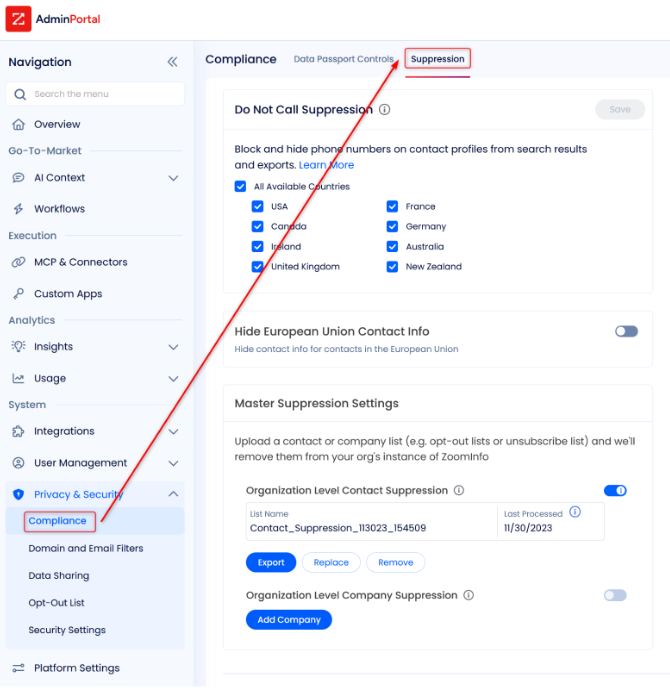
- Navigate to the Suppression tab under the Compliance section from the left-hand panel.
- Turn on Do Not Call Suppression by toggling individual countries’ DNC lists.
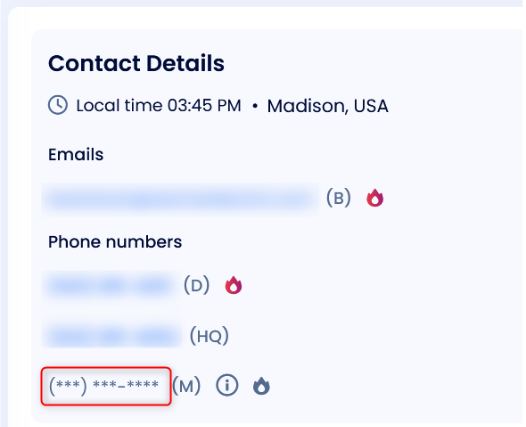
- After enabling the setting, phone numbers that are on supported DNC registries will be masked in ZoomInfo, as seen below:

- Open the Admin Portal in the top right-hand corner of ZoomInfo.
-
The impact of DNC suppression doesn’t stop within ZoomInfo. It also carries over when contact information is exported to other systems through ZoomInfo’s integrations. If a contact has a suppressed number, that number is withheld from the data sent to the destination system. For a newly created CRM record, this means the corresponding phone field will be left blank.
Understanding how ZoomInfo handles DNC information is an important part of making sure the right contact data flows into your CRM. TopLine Results can help you configure your ZoomInfo settings, map contact fields, and review how exported data appears in your CRM. Whether you’re setting up a new integration or fine-tuning an existing one, our team can help ensure ZoomInfo works effectively with your sales process. Contact us today if you’d like our support: 1-800-880-1960 or info@toplineresults.com.
You must be logged in to post a comment.